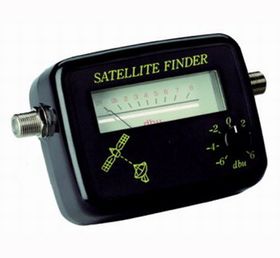
DIY Satellite Finder
DIY Satellite Finder
- DIY Satellite Finder
- Satellite meter with display and variable db control
- Colour: Black
- Inputs:
- Satellite Dish
- Satellite Receiver In
PROCEDURE for Using the DIY Satellite Finder
- Connect the meter lead from the Satellite LNB to the "To LNB" Connection on the satellite finder
- Connect the satellite cable coming from the satellite receiver toh teh "To Rec" input on the satellite finder
- Make sure your satellite receiver is on. The satellite Meter LED should be on (powered by the satellite receiver) and give a reading of around 2.
- Set the satellite dish to roughly the correct angle and direction e.g. Astra 2 satellite is found at 21 degrees elevation and 141 degrees on the compass (slight variation depending on what part of Ireland you are in).
- Set the satellite finder's scale to reading to about 5 by adjusting the control level found on the face of the satellite dish (clockwise turning with increase the reading)
- Peak the signal by slowly turning the elevation and direction of the dish. If the satellite meter reading tops the scale reduce the reading to 5 (by adjusting the level control) and continue to adjust until peak position is found.
- Verify on the satellite receiver that you have tuned the satellite dish to the correct satellite by switching to / tuning in a channel e.g. BBC 1 on the Astra 2 satellite.
- Remove the meter lead and satellite finder and connect the LNB to the satellite cable coming from your dish.
$4.17
Original: $11.92
-65%DIY Satellite Finder—
$11.92
$4.17DIY Satellite Finder
DIY Satellite Finder
- DIY Satellite Finder
- Satellite meter with display and variable db control
- Colour: Black
- Inputs:
- Satellite Dish
- Satellite Receiver In
PROCEDURE for Using the DIY Satellite Finder
- Connect the meter lead from the Satellite LNB to the "To LNB" Connection on the satellite finder
- Connect the satellite cable coming from the satellite receiver toh teh "To Rec" input on the satellite finder
- Make sure your satellite receiver is on. The satellite Meter LED should be on (powered by the satellite receiver) and give a reading of around 2.
- Set the satellite dish to roughly the correct angle and direction e.g. Astra 2 satellite is found at 21 degrees elevation and 141 degrees on the compass (slight variation depending on what part of Ireland you are in).
- Set the satellite finder's scale to reading to about 5 by adjusting the control level found on the face of the satellite dish (clockwise turning with increase the reading)
- Peak the signal by slowly turning the elevation and direction of the dish. If the satellite meter reading tops the scale reduce the reading to 5 (by adjusting the level control) and continue to adjust until peak position is found.
- Verify on the satellite receiver that you have tuned the satellite dish to the correct satellite by switching to / tuning in a channel e.g. BBC 1 on the Astra 2 satellite.
- Remove the meter lead and satellite finder and connect the LNB to the satellite cable coming from your dish.
Product Information
Product Information
Shipping & Returns
Shipping & Returns
Description
DIY Satellite Finder
- DIY Satellite Finder
- Satellite meter with display and variable db control
- Colour: Black
- Inputs:
- Satellite Dish
- Satellite Receiver In
PROCEDURE for Using the DIY Satellite Finder
- Connect the meter lead from the Satellite LNB to the "To LNB" Connection on the satellite finder
- Connect the satellite cable coming from the satellite receiver toh teh "To Rec" input on the satellite finder
- Make sure your satellite receiver is on. The satellite Meter LED should be on (powered by the satellite receiver) and give a reading of around 2.
- Set the satellite dish to roughly the correct angle and direction e.g. Astra 2 satellite is found at 21 degrees elevation and 141 degrees on the compass (slight variation depending on what part of Ireland you are in).
- Set the satellite finder's scale to reading to about 5 by adjusting the control level found on the face of the satellite dish (clockwise turning with increase the reading)
- Peak the signal by slowly turning the elevation and direction of the dish. If the satellite meter reading tops the scale reduce the reading to 5 (by adjusting the level control) and continue to adjust until peak position is found.
- Verify on the satellite receiver that you have tuned the satellite dish to the correct satellite by switching to / tuning in a channel e.g. BBC 1 on the Astra 2 satellite.
- Remove the meter lead and satellite finder and connect the LNB to the satellite cable coming from your dish.